
Automotive-grade controllers for prototype and production vehicles
FlexCase G and FlexCase E run your control software on the vehicle, from the first bench test to volume production. Program them in MATLAB/Simulink or C, and connect them to your cloud with FlexConnect.

Choose your FlexCase
Both models use the same processor, tools, and software, so code written for one carries over to the other. The difference is how much input, output, and network capacity you need.

FlexCase G
For supervisory, ADAS, and other controllers that need the most inputs, outputs, and network channels.
- Processor
- NXP S32K344, 160 MHz, 4 MB flash
- Safety
- Designed to support up to ASIL D
- Networks
- 5x CAN FD, 1x isolated CAN, 2x LIN, 100BASE-T1 Ethernet; Gigabit Ethernet with an onboard MPU
- Analog inputs
- 30x, 14-bit
- Outputs
- 16x high side, 18x low side, 3x 5 A for three-phase motors
- EV charging
- AC (CP and PP) and DC (PLC)
- Housing
- 203 x 173 x 38 mm, 154 pins, IP67/IP69K

FlexCase E
For gateway, charging, traction, brake, and body controllers that need a compact unit.
- Processor
- NXP S32K344, 160 MHz, 4 MB flash
- Safety
- Designed to support up to ASIL D
- Networks
- 6x CAN FD, 1x LIN, 100BASE-T1 Ethernet
- Analog inputs
- 10x, 14-bit
- Outputs
- 8x high side, 8x low side (16x each on volume orders)
- EV charging
- AC (CP and PP); DC (PLC) on volume orders
- Housing
- 150 x 147 x 44 mm, 64 pins, IP67/IP69K
Specification sheet
Needs an onboard microprocessor unit (MPU)LTE and GPS also need the LTE modem add-on
| FlexCase G Version 2.2 | FlexCase E Version 2.1 | FlexCase S 1.3 | FlexCase R 1.0 (OEM) | FlexBench 1.2 | |
|---|---|---|---|---|---|
| Overview | |||||
| Status | Recommended for new designs | Recommended for new designs | Not recommended for new designsAvailable for existing programs | Not recommended for new designsAvailable for existing programs | Not recommended for new designsAvailable for existing programs |
| Typical use | Supervisory, ADAS | Supervisory, gateway, charging, traction, brake, body | I/O extender, telemetry, gateway | Customer integration or base of a custom design; fits other enclosures with sub-boards and extra I/O | Benchtop control prototyping, with easy-to-use connectors |
| Safety grade | ASIL D | ASIL D | ASIL B | ASIL D | ASIL B |
| Telematics and OTA | Yes | Yes | Yes | Yes | Yes |
| Processing | |||||
| Main MCU | NXP S32K344, 160 MHz | NXP S32K344, 160 MHz | NXP S32K144, 80 MHz | NXP S32K344, 160 MHz | NXP S32K144, 80 MHz |
| MCU application flash | 4 MB | 4 MB | 512 KB | 4 MB | 512 KB |
| Power and sensing | |||||
| Supply | 12/24 V nominal 12/24/48 V nominal1 | 12/24 V nominal 12/24/48 V nominal1 | 12/24 V nominal | 12/24 V nominal | 12/24 V nominal |
| Ignition input | 1x | 1x | 1x | 1x | 1x |
| Integrated supply voltage and current sensors | 1x each | 1x each | 1x each | 1x each | 1x each |
| 6-axis IMU | 1x (ASIL B) | 1x | 1x | 1x | 1x |
| Board temperature | 1x | 1x | 1x | 1x | 1x |
| Real-time clock | 1x | 0x | 0x | 0x | 0x |
| Buzzer | None2 | None2 | 0x1 | None2 | 1x |
| Sensor supplies | 1x VCC 2x 12 V 5x 5 V 1x VBatt | 1x 5 V 1x VBatt | 1x 5 V | 1x 5 V | 3x 5 V |
| Networks and interfaces | |||||
| CAN | 5x CAN FD (1x wake on CAN) 1x isolated CAN | 6x CAN FD (1x wake on CAN) 0x isolated CAN1 | 1x CAN FD, 2x CAN | 4x CAN FD | 1x CAN FD, 2x CAN |
| LIN | 2x (1x wake on LIN) Master/slave, software configured | 1x (1x wake on LIN) Master/slave, software configured | 0x | 1x master | 0x |
| MCU Ethernet (100BASE-T1) | 100 Mbps | 100 Mbps | 0x | None2 | 0x |
| Onboard microprocessor unit (MPU)Features in this group need an onboard microprocessor unit (MPU). | |||||
| MPU options | Radxa CM, Raspberry Pi CM, NVIDIA Jetson | Radxa CM, Raspberry Pi CM | |||
| MPU Ethernet (100BASE-TX or 1000BASE-T) | 1000 Mbps | 0x | 0x1 | 1000 Mbps | 100 Mbps and 1000 Mbps |
| Wi-Fi and Bluetooth | Wi-Fi 2.4/5.0 GHz (IEEE 802.11b/g/n/ac) and Bluetooth 5.0 | Wi-Fi 2.4/5.0 GHz (IEEE 802.11b/g/n/ac) and Bluetooth 5.0 | |||
| USB | 1x USB 2.0 USB 3.01 | 1x USB 2.0 A | 1x USB 2.0 A | 2x USB 2.0 | 2x USB 2.0 A |
| Display (HDMI, eDP, LVDS) | HDMI, eDP, LVDS1 | None2 | None2 | 1x mini HDMI eDP, LVDS1 | 1x HDMI |
| Serial (RS232, RS485) | 1x RS232 RS4851 | None2 | None2 | RS232, RS4851 | 1x RS232 RS4851 |
| Global LTE and GPSAlso needs the LTE modem add-on | Choose LTE-M, NB-IoT, or Cat 4, with GNSS | Choose LTE-M, NB-IoT, or Cat 4, with GNSS | |||
| Inputs and outputs | |||||
| Analog inputs | 30x, 14-bit0-36 V; 0-5 V, 0-10 V, 0-20 mA1 | 10x, 14-bit0-36 V; 0-5 V, 0-10 V, 0-20 mA1 | 6x, 12-bit0-36 V; 0-5 V, 0-10 V, 0-20 mA1 | 12x, 14-bit0-36 V; 0-5 V, 0-10 V, 0-20 mA12x differential, high resolution1Up to 300 V, 0.2 mV/tick | 6x MCU, 12-bit 6x MPU, 10-bit0-36 V; 0-5 V, 0-10 V, 0-20 mA, 4-20 mA1 |
| Analog outputs (0-5 V) | 2x | 2x | None2 | 0x | 0x (future release) |
| Digital inputs | 18x PWM/quadrature/SENTSoftware pull-up/down | 12x PWM/quadrature/SENTSoftware pull-up/down | 8x PWM/quadrature/SENTPull-up | 12x PWM/quadrature/SENTPull-up | 6x PWM/quadrature/SENT (pull-up default) 9x MPU digital inputs (pull-up) |
| Magnetic inputs (Hall/VR) | 0x (6x Hall effect1) | 0x (6x Hall effect1) | 0x | 0x | 0x |
| Digital outputs (GPO/PWM) | 16x high side, 3 A cont., 7 A max 18x low side, 3 A cont., 7 A max 0x half-bridge 3x 5 A, three-phase motor supportOVP/UVP/OTP/OCP | 8x (16x1) high side, 3 A cont., 7 A max 8x (16x1) low side, 3 A cont., 7 A max 0x (16x1) half-bridgeOVP/UVP/OTP/OCP | 4x (8x1) high side, 1.5 A cont. 4x (8x1) low side, 1.5 A cont. 0x (16x1) half-bridge | 8x high side, 3 A cont., 7 A max 8x low side, 3 A cont., 7 A max 8x half-bridge | 16x 3 A, high side, low side, or half-bridgeOCP |
| EV charging | |||||
| EV charge support | 1x AC (CP and PP) 1x DC (PLC) | 1x AC (CP and PP) 1x DC (PLC)1 | 0x | None2 | 0x |
| Charging software stack (option) | ISO/IEC 15118, DIN 70121, SAE J2847/2, IEC 61851-1, SAE J1772 | Not available | |||
| Mechanical | |||||
| Expansion board support | Yes, 18 custom I/O | No | No | Yes | No |
| Ingress | IP67/IP69K | IP67/IP69K | IP67/IP69K | Not specified | Not specified |
| Pins and connectors | 154 pins | 64 pins | 48 pins | 72 pins, plus HDMI and USB | 80 pins, plus HDMI, 2x USB, 2x RJ45, DB9, barrel jack |
| Dimensions | 203 x 173 x 38 mm | 150 x 147 x 44 mm | 153 x 130 x 42 mm | 113 x 47 x 23 mm | 150 x 150 x 45 mm |
| Buy Now | Buy Now | Pricing | Contact us | FlexBench page | |
FlexCase S, FlexCase R, and FlexBench remain available for existing programs but are not recommended for new designs.
1 Not fitted to off-the-shelf units; available on volume orders. 2 Not available without an NRE fee, including on volume orders.
We also build custom variants of FlexCase, with features added or removed for your application. See custom hardware →
Software support for FlexCase G and E
FlexCase G and E come with software on the microcontroller, from security and drivers up to diagnostics and calibration. Select a layer to see what it does.
Hardware Security Engine (HSE)
A dedicated security engine inside the microcontroller for secure boot, key storage, and encryption. It supports cybersecurity work to ISO/SAE 21434.
FlexConnect sends live and historical data from each vehicle to a dashboard or to your own software through an API. It runs on FlexCase with an onboard microprocessor unit (MPU) and uploads data over Wi-Fi, or over LTE with the LTE modem add-on. Learn about FlexConnect →
What every FlexCase gives you
G and E share the same platform, so the tools, connectivity, and add-ons below apply to both.
Built for the vehicle
FlexCase is meant to stay in the vehicle after development, not only sit on a test bench.
- Functional safety: designed to support up to ASIL D, on the NXP S32K344 automotive microcontroller.
- Sealed housing: IP67 and IP69K enclosures with automotive connectors.
- Protected outputs: over-voltage, under-voltage, over-temperature, and over-current protection on every driver.
- EMC: certified for specific applications. Because results depend on the installation, we recommend rerunning EMC testing for each application, and we can support that work.
- AUTOSAR: AUTOSAR compliant.
- Vehicle power: 12/24 V nominal, with 48 V on volume orders, plus ignition input and wake on CAN or LIN.
| Item | FlexCase G | FlexCase E |
|---|---|---|
| Safety grade | Up to ASIL D | Up to ASIL D |
| Ingress | IP67/IP69K | IP67/IP69K |
| Supply | 12/24 V (48 V1) | 12/24 V (48 V1) |
| EMC | Certified for specific applications | Certified for specific applications |
| AUTOSAR | Compliant | Compliant |
| Wake sources | Ignition, CAN, LIN | Ignition, CAN, LIN |
| Monitoring | Supply voltage and current, board temperature, IMU | Supply voltage and current, board temperature, IMU |
1 Volume orders
Program, tune, and test live
Drop in your MATLAB/Simulink controller using NXP's toolboxes, or write C, with no separate software licence fees.
- Real-time tuning: define the variables you want to adjust, change them during a test, and watch the results live with tools such as FreeMASTER.
- Real-time and HIL: run experiments and hardware-in-the-loop tests with the same controller that goes on the vehicle.
- Displays and dashboards: drive an operator display or dashboard with tools such as FreeMASTER and Grafana.
- Documentation: quick-start and Simulink guides, the user manual, pinouts, and application notes are on the resources page.
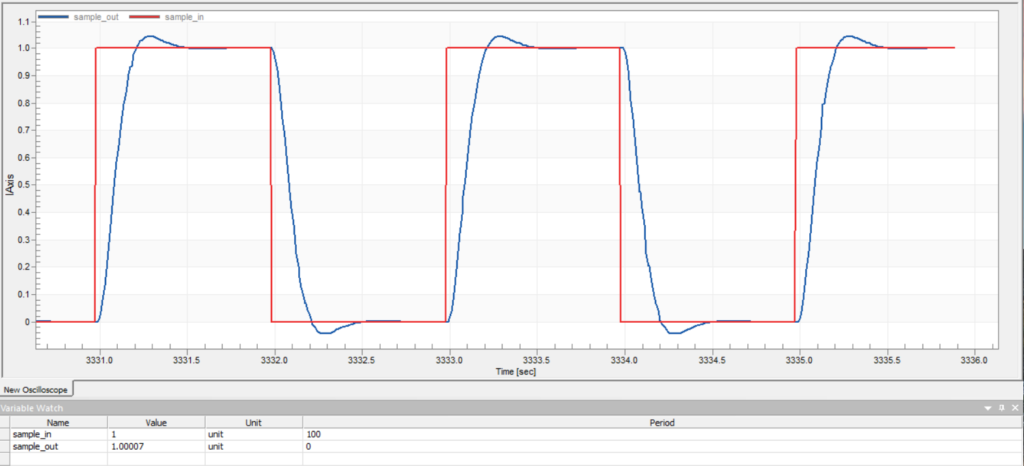
Live signal monitoring during a test
Wireless and cloud ready
Add an onboard microprocessor unit (MPU) for Wi-Fi and Bluetooth, and an LTE modem for cellular, when your controller needs to talk to more than the vehicle network.
- Wi-Fi and Bluetooth: 2.4/5 GHz 802.11b/g/n/ac and Bluetooth 5.0, with an onboard MPU.
- Cellular and location: LTE-M, NB-IoT, or Cat 4 with GNSS, with an onboard MPU and the LTE modem add-on.
- Onboard MPU: options include Radxa CM, Raspberry Pi CM, and NVIDIA Jetson, for logging, vision, or machine learning at the edge.
- FlexConnect: send vehicle data over Wi-Fi or LTE to your dashboard or your own software through the FlexConnect cloud.
CAN FD, LIN, I/O→FlexCase
control + onboard MPU→LTE or Wi-Fi
to FlexConnect
Illustrative example
Works with the tools you already use
FlexCase plugs into your existing workflow. The real-time microcontroller runs your control software, and an onboard MPU runs machine learning, AI, and autonomous driving software beside it.
Use it for advanced driver assistance, predictive maintenance, connected vehicles, and estimation. See the applications below for examples. Select a category to see what FlexCase works with.
Modelling and simulationMATLAB, Simulink, CarSim
Build and test controllers as models, then generate code for FlexCase.
- MATLAB
- Simulink
- CarSim
Embedded softwareC and C++, AUTOSAR, CODESYS
Write controller code directly, or use standard embedded software frameworks.
- C and C++
- AUTOSAR
- CODESYS
AI, vision, and roboticsOnboard MPUPython, ROS, OpenCV, TensorFlow
Run perception, machine learning, and robotics software beside the real-time controller.
- Python
- ROS
- OpenCV
- TensorFlow
Operating systems and platformsOnboard MPUUbuntu, QNX, VxWorks, Docker, Android Auto
Choose the operating system or container setup that fits your application.
- Ubuntu
- QNX
- VxWorks
- Docker
- Android Auto
CloudOnboard MPUAWS, AWS IoT, Microsoft Azure, Azure IoT
Send vehicle data to your own cloud services, or use FlexConnect.
- AWS
- AWS IoT
- Microsoft Azure
- Azure IoT
Processors and compute modulesNXP, NVIDIA, Radxa, Raspberry Pi
The NXP microcontroller runs real-time control; MPU options add more processing.
- NXP
- NVIDIA
- Radxa
- Raspberry Pi
Select a feature to see its details.
One controller from concept to production
Use the same FlexCase, tools, and software through development, validation, and production, so you do not have to port your code to new hardware later.
- 1
Concept
Prototype on the bench with Simulink or C and real-time tuning.
- 2
Design and calibration
Tune parameters live and calibrate over CAN.
- 3
Validation
Hardware-in-the-loop and vehicle testing, with EMC testing support for your application.
- 4
PPAP
Production part approval on the same hardware design.
- 5
Production
Program units yourself or at the factory, and keep them up to date in the field.
FlexCase across vehicle types
See how FlexCase and FlexConnect are applied to different kinds of vehicles.
Electric vehicles
Charging, battery, and powertrain control for EV builds.
Electric vehicles → HydrogenHydrogen vehicles
Coordinated fuel cell and battery power management.
Hydrogen vehicles → ConventionalConventional vehicles
New builds and retrofits of internal combustion vehicles.
Conventional vehicles → AutonomousAutonomous vehicles
Real-time control beside perception and planning software.
Autonomous vehicles → TowedTowed vehicles
Braking, monitoring, and connectivity for trailers and towed equipment.
Towed vehicles → Your ApplicationSomething else?
Tell us what your controller needs to do and we will suggest a configuration.
Contact us →Need a production variant?
We build custom versions of FlexCase for OEMs and integrators: adding features, removing what you do not need to lower unit cost, and protecting your software IP in production.

Custom FlexCase E for a global integrator
An integrator supplying a vehicle manufacturer needed a production control module in 18 weeks from kickoff to volume delivery. We added PLC for EV charging to FlexCase E, programmed the integrator's closed-source software securely during manufacturing, and moved production to a contract manufacturer in the OEM's country.
Read the case study →Common questions
What is the difference between FlexCase G and FlexCase E?
They share the same processor, tools, and software. FlexCase G has more I/O (30 analog inputs, 34 outputs, 154 pins), an isolated CAN channel, Gigabit Ethernet (with an onboard MPU), a real-time clock, and expansion board support. FlexCase E is smaller, with 10 analog inputs, 16 outputs, and 64 pins, and suits most gateway, charging, and body controllers.
How do I program a FlexCase?
Use MATLAB/Simulink with NXP's toolboxes, or write C. You can flash and debug over Ethernet or Wi-Fi. The quick-start guide, Simulink guide, and user manual are on the resources page.
Is FlexCase EMC certified?
FlexCase has been EMC certified for specific applications. EMC results depend on how and where the controller is installed, so we recommend rerunning EMC testing for each application. We can support that testing.
Are there software licence fees?
No. There are no separate software licence fees for FlexCase. You use your own MATLAB/Simulink or C development tools.
Can I buy a single unit for prototyping?
Yes. Off-the-shelf units can be ordered from the pricing page. For volume pricing or a quote, contact us.
What do the "volume orders" notes in the specifications mean?
Some features are part of the board design but are not fitted to off-the-shelf units, such as 48 V supply or extra outputs. They can be fitted on volume orders. Features marked as needing an NRE fee require design work before they can be added.
Can a FlexCase run Linux applications?
Yes, with an onboard microprocessor unit (MPU) running Linux alongside the real-time microcontroller. Options include Radxa CM, Raspberry Pi CM, and NVIDIA Jetson. See the MPU pinout page for details.
Can you build a custom version for production?
Yes. We build production variants with added or removed features, custom branding, and secure programming of your software. See custom product development.
Are FlexCase S, FlexCase R, and FlexBench still available?
Yes, for existing programs. For new designs we recommend FlexCase G or E. Their specifications are under other models.
Not sure which controller you need?
Send us your I/O list and application, and we will recommend FlexCase G or E, or scope a custom variant.